Back to portfolio

Personal project / Asset & workflow tooling

AssetGuy

AssetGuy is a Rust CLI for querying, organising, downloading and installing the assets you own on Fab. For Unreal developers on Windows, it combines engine-version and download-state filters, maintains custom categories and installs the selected asset into a project or engine.

When does AssetGuy help more than the launcher’s library?

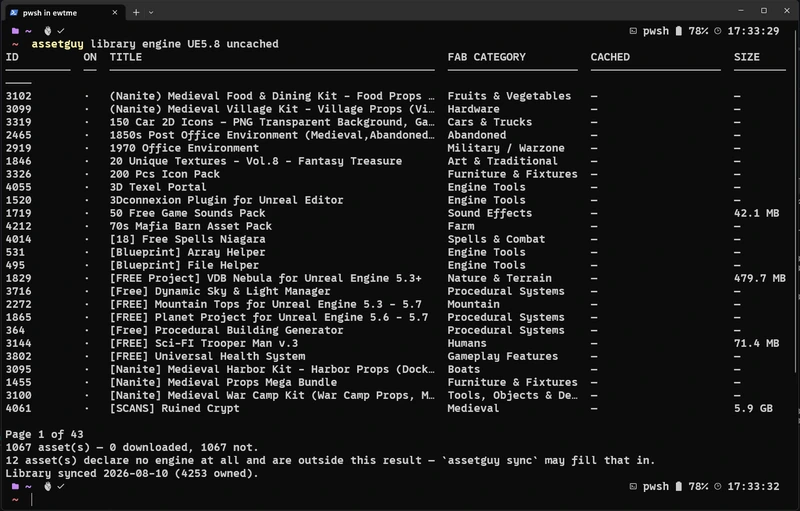
If the question is “which packs do I own that support this Unreal version and are not downloaded yet?”, browsing cards means finding and checking each item. assetguy library engine UE5.8 uncached answers from the stored catalogue. Rule-based categories organise new assets after sync; the CLI makes queries repeatable and provides JSON output for scripts.

The benefit is library management: querying without loading thumbnails or asking Fab for data, separating downloads from installation and inspecting the destination before copying files. It provides an alternative to this launcher workflow, not a replacement for the whole application. Fab and Windows are supported today; PostgreSQL already allows a shared catalogue, while shared file caching and a GUI remain planned.

  • Rust
  • Tokio
  • SQLite
  • PostgreSQL
  • Windows
AssetGuy terminal showing owned assets filtered by Unreal Engine 5.8 compatibility and uncached state
Existing project capture: assetguy library engine UE5.8 uncached. The footer reports the scope of the results and missing engine metadata; counts belong to the captured library.

01 / Context

Large libraries make asset selection laborious

The starting point was the effort of finding an asset in a thumbnail grid, checking compatibility and discovering whether its files were already on disk. The launcher combines these questions within visual browsing. I needed composable queries over an owned library, with results readable in a terminal and usable by scripts.

I chose a queryable catalogue built from the launcher’s local state and metadata obtained during sync. Avoiding marketplace requests makes the read path lighter, but has a consequence: the catalogue represents the last synchronisation rather than live remote state. Updating it is therefore explicit. Provider, storage, download and installation have separate boundaries because they change for different reasons.

From synchronisation to asset installation

  1. 01

    Synchronisation

    assetguy sync records owned assets and then enriches their metadata. Authentication and networking belong to explicit operations; querying the library does not trigger synchronisation.

  2. 02

    Query and inspection

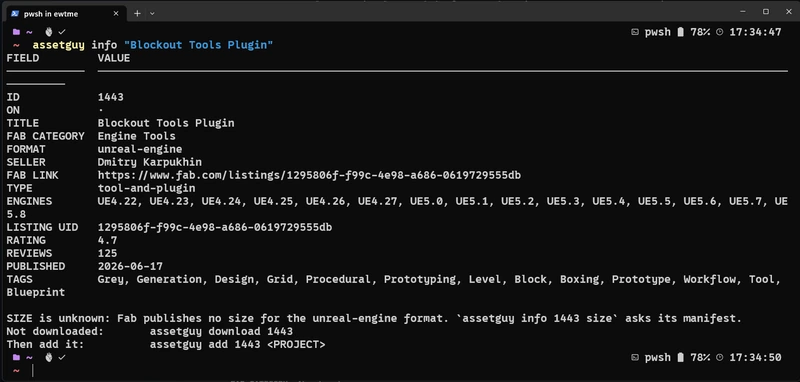
    assetguy library engine UE5.8 uncached filters the stored catalogue. assetguy info "Blockout Tools Plugin" shows details and available versions before selecting files.

  3. 03

    Download and installation

    assetguy download fills the cache. assetguy add, assetguy new and assetguy install are separate operations for project content, a complete project and an engine plugin; their arguments identify the asset and destination.

The catalogue can be queried without contacting Fab. With SQLite this is fully local; PostgreSQL queries the configured database server, not the marketplace.

02 / Design & architecture

Architecture decisions and their consequences

Local catalogue

Catalogue queries separated from network operations

assetguy library reads the configured database. assetguy sync refreshes it; assetguy search queries Fab’s public catalogue; assetguy download fetches files. This makes each action’s cost explicit. assetguy add requires cached files and, when they are missing, names the download command instead of silently transferring gigabytes.

Thumbnail URLs arrive with metadata, but image files are optional because a terminal does not draw them and a large library can contain gigabytes of pictures. The interface is a CLI first so the underlying behaviour can stabilise before a GUI depends on it.

The catalogue can become stale between synchronisations. I accepted that tradeoff to make query cost predictable and independent of marketplace availability. Missing metadata remains visible: an empty listing does not prove there are no compatible assets.
Provider boundary

Contracts describe provider operations

Fab’s owned library, public detail, public search and CDN have different authentication requirements. A generic authenticated HTTP client would carry the wrong assumptions across those routes. The provider contract instead describes operations such as owned assets, listing detail, authentication and delivery.

Separate roles and capabilities let a command explain an unsupported operation by name. Fab is the implemented provider today. The download boundary is a DownloadPlan: the provider converts its manifest into a plan, while chunk fetching and file assembly consume the plan without depending on Epic’s API types.

This boundary makes workflows testable without HTTP details and concentrates Fab API changes inside its provider implementation. It does not yet prove support for another store: a second provider will need to satisfy those contracts against its own real cases.

Storage choice

One configured backend and four storage roles

SQLite is the zero-configuration default; PostgreSQL is already implemented. The chosen backend holds the catalogue, curation and download/install state. Four storage roles narrow what each caller may do: AssetStore, CatalogWriteStore, CurationStore and DownloadStore. A download does not need the ability to rewrite category rules.

Storage contracts use synchronous calls to match the blocking SQLite driver, while provider/network operations are asynchronous. Backend-specific SQL sits behind a dialect boundary. Backend selection is persistent configuration, and an invalid connection fails explicitly rather than falling back to a different library. Switching databases does not migrate the existing data.

I chose SQLite as the default so individual use does not require server administration. PostgreSQL provides a common catalogue at the cost of connections, credentials and database operations. Shared metadata and paths do not make the files available on other machines; that requires the shared cache that is still unimplemented.

Search & curation

Rule-based categories and independent filters

Custom categories express matching rules rather than a frozen set of tags. Newly synchronised assets can fall into the same organisation automatically. Engine version, format, marketplace category and cached state are separate filter dimensions because they answer different questions.

Unreal version matching respects dotted components: UE4.1 must not also mean UE4.10. Engine and format metadata stay separate; a Unity format does not imply Fab supplies Unity version information. Missing metadata and partial search coverage are reported, so an empty result is not mistaken for complete knowledge of the marketplace.

Synchronisation

Sequential pagination, parallel enrichment

Sync first fetches the owned list, whose cursor pagination is sequential. It then enriches each asset with details using bounded parallel workers. The request budget controls API pressure; it is not advertised as a percentage of network throughput.

Owned-list requests use the account session, while public detail requests use an anonymous client. This distinction follows the API’s observed behaviour. A removed public listing can still be owned and downloadable, and an absent byte count is unknown rather than zero. Manifest inspection is a separate way to learn Unreal download sizes.

Download assembly

Ordered assembly and bounded download memory

Downloads fetch chunks concurrently but assemble files through an ordered writer, calculating SHA1 as bytes are written. Completed, verified files form the resume state; the manifest identity prevents mixing different builds. Downloaded files are promoted from a partial directory only after the work completes.

Chunks reused by several files have a bounded in-memory cache. Because the plan already knows the write order, eviction can drop the chunk whose next use is furthest away. This trades an occasional refetch for a predictable memory ceiling instead of storing the entire asset twice on disk.

An ordered writer simplifies verification and resumption, but may wait for a delayed chunk while others have arrived. A cache limit may require fetching a chunk again. The choice prioritises integrity and predictable memory over maximising parallelism at any cost.

Controlled installation

Installation follows asset type and manifest

Content packs go into a project’s Content directory; full projects can be copied as projects; engine plugins follow the manifest’s paths. Dry run previews the action, and collisions require an explicit force choice. Project copies are staged on the destination volume before promotion; engine staging stays outside the plugin scanner’s directory.

Plugin installation only accepts a registered engine root. Files come before the launcher records, and installation maintains the launcher’s manifest, item, installed-list and EOSH records. Backups and read-back checks protect the installed-list update. The launcher must be closed because it can rewrite those records from its own in-memory state.

Installing content into a project and installing a plugin into an engine affect different structures. Separate commands make the destination and effect explicit. Launcher records are the most sensitive integration point: copying a folder alone does not make Epic’s tool recognise installation and removal.

State & credentials

Configuration, credentials and records have different lifecycles

Configuration lives in the roaming profile; OAuth credentials, cache and audit files live in the local profile. Login happens in the user’s browser and returns an authorisation code, which is redacted by command identity in the audit log. Database passwords are supplied separately from the stored connection URL.

The launcher’s state is read-only for browsing and synchronisation. install, uninstall and repair are the explicit exceptions that write its records. A monthly local audit records operations; doctor exposes integrity and launcher-state issues without relying on a developer to invent diagnostic database queries.

AssetGuy asset detail showing compatible Unreal versions, metadata, unknown size and suggested download command
Existing project capture: assetguy info "Blockout Tools Plugin". Unknown size is explained rather than displayed as zero, and the next command is shown alongside the asset.

03 / Under the hood

Asset operations in the core; presentation in the CLI

assetguy-core

Provider contracts, storage, filtering, synchronisation, verified downloads, project installation and launcher integration. The CLI uses these operations; a future GUI is intended to reuse them.

assetguy-cli

Routes commands with clap, parses composable keywords, prints tables and JSON, and reports progress. Terminal formatting stays separate from the operations that manipulate assets.

Tokio / DownloadPlan

Asynchronous network work and bounded worker pools sit beside an ordered assembly path. Provider-specific manifests are translated before they reach that path.

SQLite / PostgreSQL

Two implemented backends share role-based contracts and a semantic conformance suite. SQLite is also used to read launcher data and keep the local audit, even in a PostgreSQL build.

How the behaviour is checked

Development checks include cargo fmt, clippy with warnings as errors, unit tests and manual gates against real assets. A backend-independent conformance suite checks the same storage semantics against SQLite and PostgreSQL. Installation also needs an editor check: a passing unit test alone cannot prove content appears in Unreal’s Content Browser or that the launcher can remove an installed plugin.

04 / Work in progress

What is implemented and what still needs work

Work in progress

AssetGuy is an early-development Windows CLI under the MIT licence, with no affiliation to Epic Games. Browsing, categories, OAuth, sync, public search, downloads, Unreal content/project installation, engine plugins and both database backends are implemented. Command names and behaviour can still change before 1.0.

Next directions are a shared team file cache, a second provider and a GUI over the existing core. A shared database already exists, but does not make asset files available to other machines by itself. Unity and Godot installation are broader goals rather than implemented integrations; the working installation paths described here are Unreal’s.

Explore the project

The README covers commands, filters, database configuration, downloads, installation safeguards and current limits. The source shows the boundaries between the CLI, core and Fab integration.

Read the documentation on GitHub

Contact

Québec City, QC, Canada / Available for opportunities

I'm open to opportunities in software development, tools programming and gameplay programming, as well as junior 3D artist roles. If my experience could be a good fit for your team, I'd be happy to connect through my social profiles.